Can you automate a blog with GitHub Actions and still keep your own voice? I think so, and I now run mine that way from my phone. I answer interview questions in a GitHub issue, read a preview, and tap merge. Everything in between runs in GitHub Actions with Claude.
I did not build this for fun. I have a day job and a product to build, so I do not have time to work on the blog regularly. I also cannot always get to Claude Desktop, but my phone is always with me. My starting request was simple: let me answer interview questions, review work and merge pull requests from my phone, and post one or two articles a week.
This article covers what I built, how it works, why I locked it down so hard, and the six failed runs it took before the first article made it through. If you read my earlier piece on the probl.me content pipeline, this is what it turned into.
What does the pipeline do from my phone?
An article has nine stages, and I touch three of them. I open an idea as a GitHub issue. Claude asks me six questions in the thread, I answer in any order, and I comment @claude done when I have said enough. The third stage is the merge at the end.
Everything after that runs in GitHub Actions. One stage researches the topic with web access. A second stage drafts the article with no web and no shell. A third draws the images. Up to three review passes follow, and then a pull request opens with a preview link.
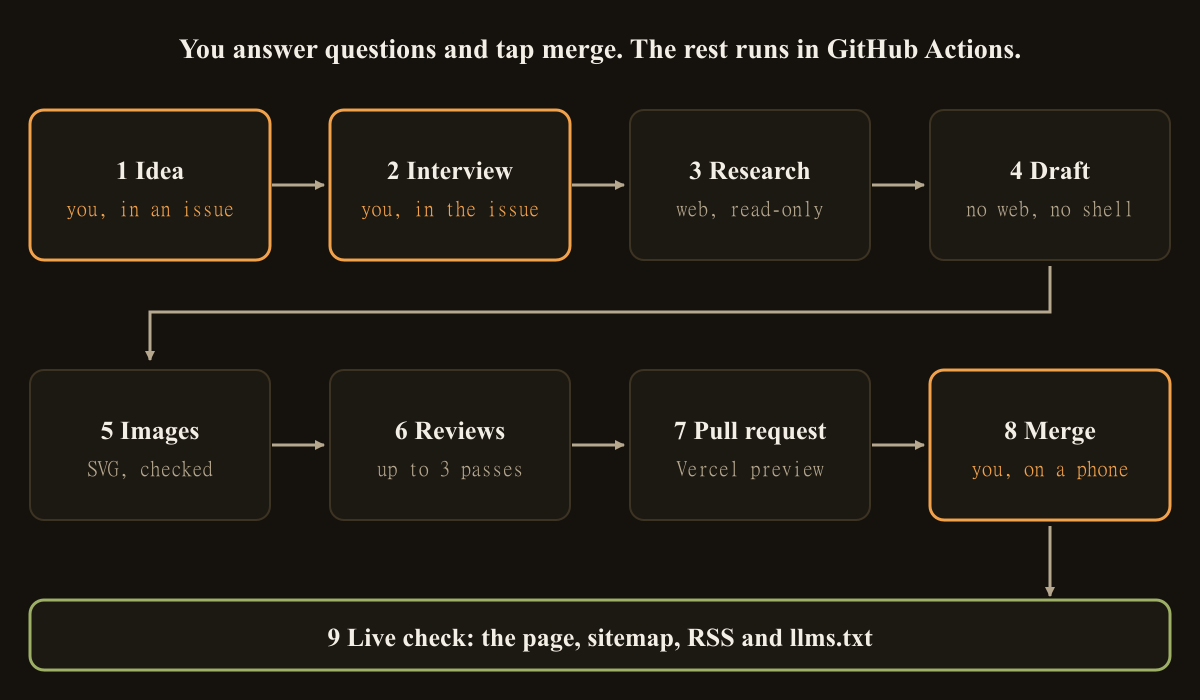
I read the preview on my phone and merge. After the merge, a job checks that the page, the sitemap, the RSS feed and llms.txt all show the new article, then closes the issue.
The interview is the one stage I refuse to automate. My answers are the part of each article that no tool can supply. Research and drafting wrap around them, but they stay the core.
Why use GitHub issues and Actions instead of desktop sessions?
My first setup ran on four scheduled Claude Desktop sessions: an idea batch, a queue check, a pull request reminder and a monthly retrospective. Each one needed Claude Desktop, and I cannot always get to it. I paused all four.
Issues and pull requests work on a phone. The GitHub app lets me answer a thread, open a preview and merge without a laptop. That is the whole reason this setup works for me.
Cost mattered too. My goal has been to spend as little money as possible on this blog. GitHub’s billing docs say standard hosted runners are free in public repositories. The Claude steps use my existing Pro subscription, because the claude-code-action accepts an OAuth token stored as a secret.
My goal has been to spend as little money as possible on this blog website, so I should be honest about what I have not measured. I do not yet know how much of my Pro usage one article takes. If I hit the limit, a Claude step fails and the workflow tells me to retry later. It never falls back to a paid API key on its own.
How do I stop strangers from steering an agent on a public repo?
A public repository means anyone can open an issue or leave a comment. So the first rule is that only my GitHub account can start any stage. Each job checks the issue author and the event sender before it touches a secret. The pipeline filters out other people’s comments before the model reads the thread.
I locked the repository down to match. The ruleset on main requires a pull request and 11 passing checks, with no bypass. The default workflow token is read-only. I allow only a short list of actions, and I pin each one to a full commit SHA, as GitHub’s security hardening guide recommends. I wrote about that habit in pinning GitHub Actions.
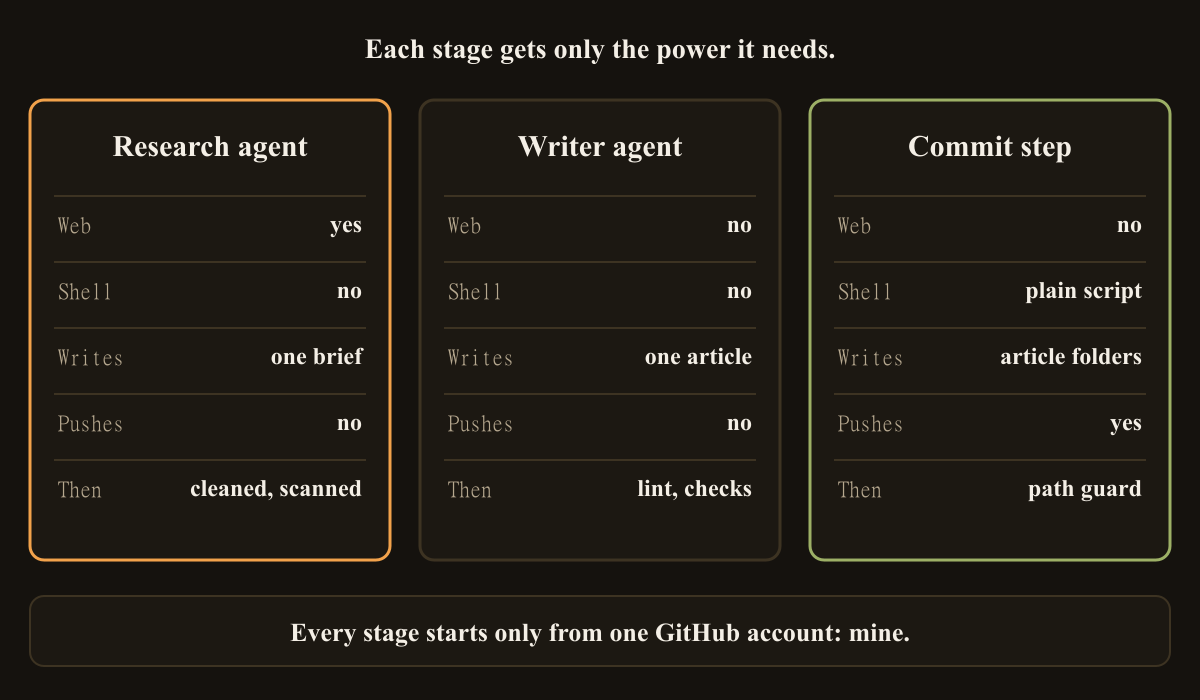
The bigger risk is text the agent reads. OWASP describes indirect prompt injection as instructions hidden in external content, such as a web page. So the one stage that reads the web has a read-only token and cannot write anything but a brief. Code cleans that brief and scans it for injection before the Writer ever sees it.
The Writer has no web and no shell, and it can edit one file. Plain scripts, not a model, commit the result from a clean repository. Microsoft reported that the Read tool in this same action could once expose an API key from the process environment, which is why I keep each stage’s power small. Their write-up of the incident is worth reading.
I cannot promise this is injection-proof. OWASP says these defenses reduce the risk without removing it. My last line of defense is that I read the preview and merge by hand. I covered the same worry in prompt injection and AI agents.
What broke on the first real run?
I would not run a pilot article until every stage existed. My words were: “I don’t want to prompt a pilot article to be created until we have everything built to produce a fully completed article that has passed through the entire pipeline.” Every change to the workflow code got a review from a separate agent, and those reviews caught real bugs before anything ran.
Then I ran the first full test. It failed six times before it worked. Two failures came from saving my interview notes. A safety check counted the runner’s own scratch folder as a stray file. After I fixed that, a fresh repository made every tracked file look untracked, so a plain branch switch refused to run.
The other four failures were the same error: the step that opens the pull request kept returning HTTP 401. I spent three rounds on theories about the token: a dead token, a probe that passed, and the wrong kind of API call. None of it helped.
A reviewer reading the failed logs found the real cause. The publish step checks the article branch out into the working folder. That replaced the pipeline’s own scripts with an older copy from the branch, so the old script ran. The fix was to copy the tools aside before any checkout and run them from the copy.
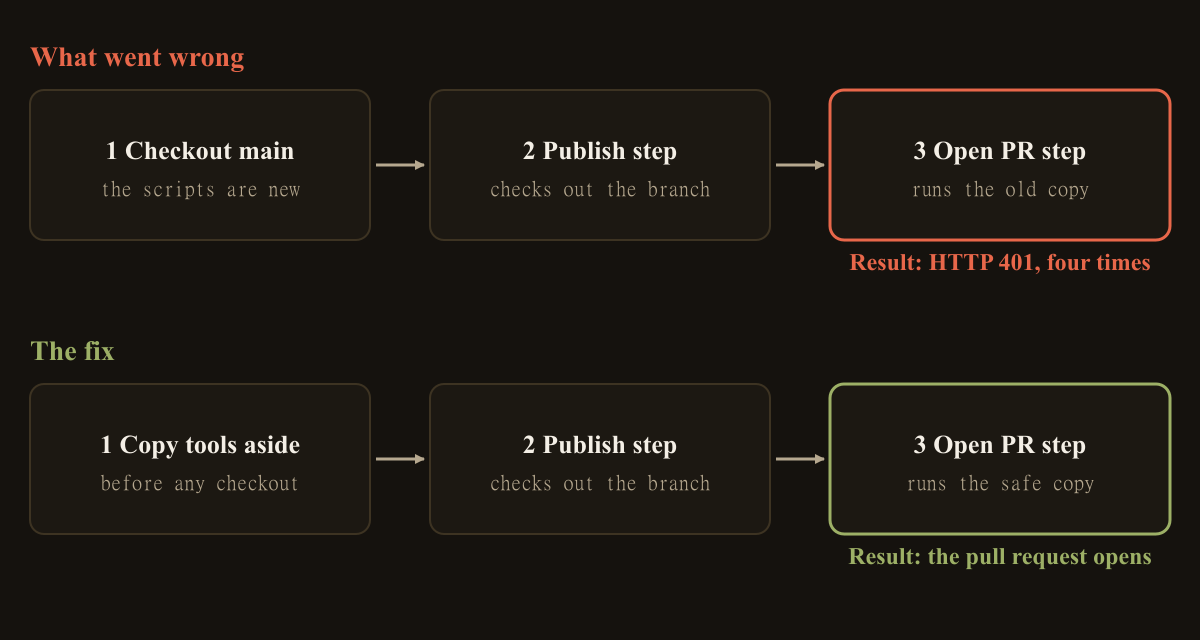
That bug was also a security lesson. A script from a branch should never run with a write token. I got that fix for free.
Three smaller surprises followed. Merging the pull request closed my issue, because its body said “Closes #165”, and my publish tracking only watches open issues. Artifact uploads would have skipped my hidden scratch folder, since upload-artifact v4.4.0 stopped including hidden files, and a reviewer caught that before it ran.
The third surprise: a pull request opened with the default token does not run my checks, because GitHub says such events generally do not start new workflow runs. So I close and reopen the pull request once.
Once it worked, the run from my @claude draft comment to the “ready for you” comment took 11 minutes and 24 seconds. Every automated review passed on the second pass. I merged from my phone. That first article, from this test run, goes live on Tuesday 1 December, so this piece comes out first. The whole effort took about a week and 28 merged pull requests.
How do I change an article from my phone?
After the test, I asked a plain question: how would I request changes to the article text or images from my phone? The pipeline had no answer, so I built one.
On an open article pull request, I comment @claude revise and say what I want. I can ask for text and image changes in the same comment. Only my account can use it.
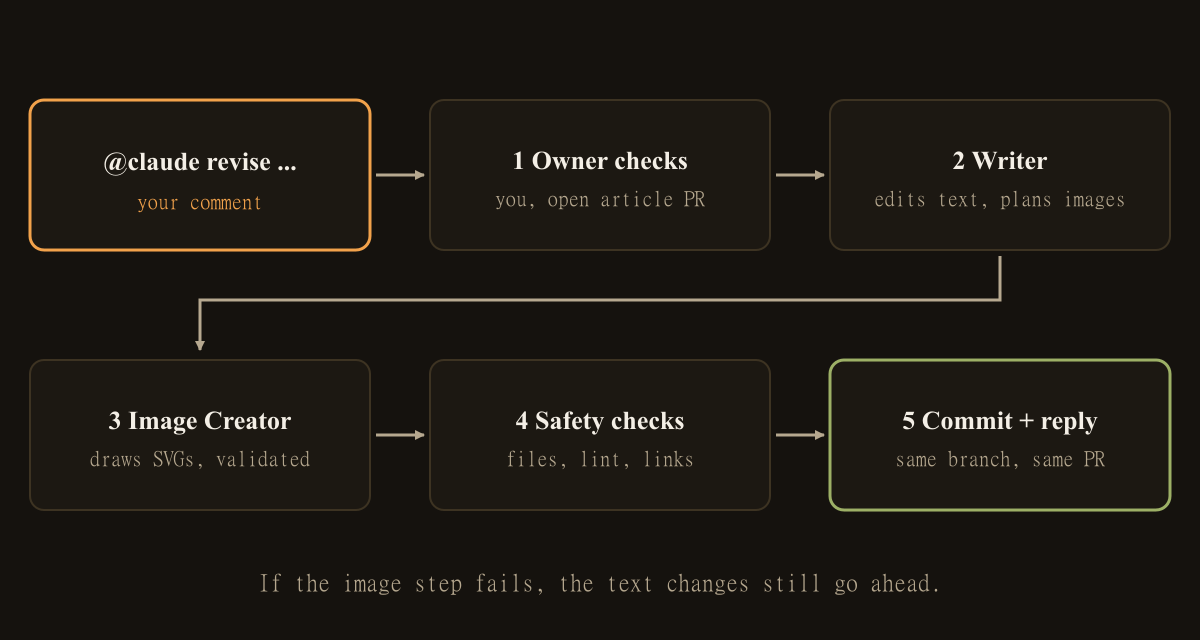
The Writer edits the text and plans the image work. A separate step draws new or redrawn diagrams as SVG, and the same validator that checks draft images checks these. Safety checks confirm that only the article and its own images changed. Then the result lands on the same branch, and a reply tells me what changed.
It has limits. It draws diagrams and heroes, not photos. It works only on open pull requests. The review agents do not re-run on a manual revision. It has not run on a real article yet, so I expect a bug or two when it does.
What would I tell someone building this?
Start with what you can do on a phone, then build backward from it. For me that was one interview and one merge. Everything else is plumbing.
Keep the manual part human. My interview answers are why these articles sound like me. Automate everything around them, and keep the merge in your own hands.
Build every stage before the first test, and expect the first run to fail anyway. Mine failed six times, and each failure taught me something about my own design. Have a second agent review every change to the pipeline, because those reviews found bugs that would have cost me runs.
I still have things to prove. The failure drills have not run yet: a missed interview answer, a poisoned research brief, and a resume after a forced failure. My Pro usage per article is also unmeasured. When I have both, I will write it up.